Riwaq Serve
Tap. Request. Connect.
A simple application connecting each table to a waiter, with a clear activity record for the manager.
Concept in development. Screens and data are illustrative.
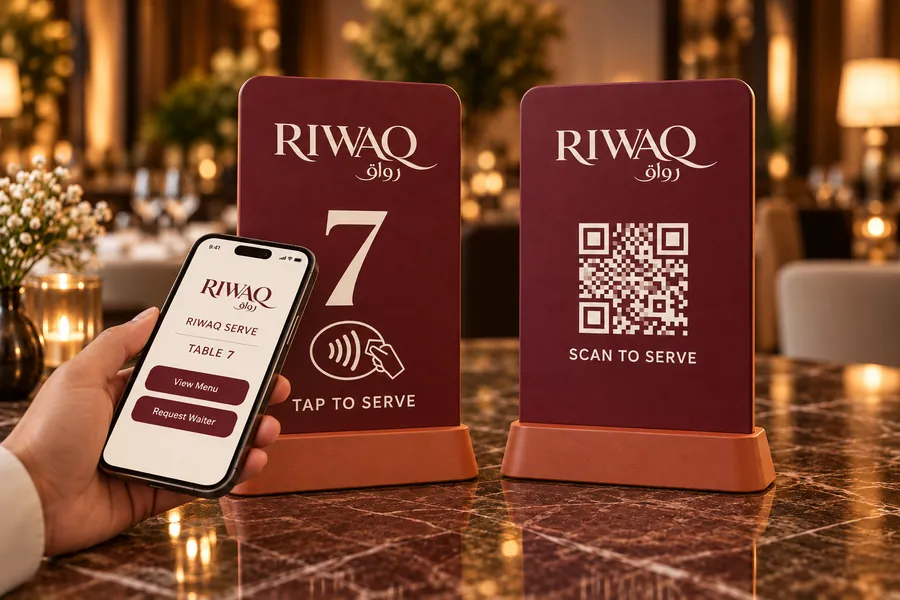
Tap the table stand
The customer taps the NFC point on the Table 7 stand. Riwaq Serve opens with the correct table number and two choices: View Menu or Request Waiter. The rear QR code provides another way to open the same table page.
Application concept. The tap opens the table page; a request is created only when the customer selects Request Waiter.
The customer
Two clear options. A direct request for a waiter.
-
Riwaq Serve
Table 7
How can we help?
View Menu Request WaiterIllustrative app screen Table home
The correct table is shown. View Menu opens the menu; Request Waiter sends a service request for this table.
-
Riwaq Serve
Table 7
Waiter requested
Table 7
Waiting for acceptance
Illustrative app screen Request sent
Once the application receives the request, the customer sees confirmation while waiting for a waiter to accept.
-
Riwaq Serve
Table 7
Ahmed is on the way
Table 7
Request accepted
Illustrative app screen Waiter accepted
When Ahmed accepts the request, the customer sees that a waiter is on the way. Ahmed is an example name.
The customer starts with two options: View Menu and Request Waiter. The application links the request to Table 7.
The waiter
A table request appears. The waiter accepts and serves.
-
Waiter / Ahmed
New waiter request
Table 7 / 15:20:00
AcceptIllustrative app screen New notification
The waiter receives a new request notification identifying Table 7 and the request time. Accept records which waiter took it.
-
Waiter / Ahmed
Go to Table 7
Accepted by Ahmed
Accepted 15:20:18
Illustrative app screen Accept and go
Ahmed accepts at 15:20:18 and goes to Table 7. The application records his name and acceptance time.
-
Waiter / Ahmed
Table 7 served
Ahmed / Table 7
Mark ServedIllustrative app screen Confirm served
After serving, Ahmed taps Mark Served. This records the service completion time so the manager can see the elapsed duration.
Illustrative times. Mark Served is the waiter's confirmation; the application does not automatically detect arrival at the table.
The manager
Who accepted. When they responded. How long service took.
Daily performance
Today / All waiters
- Accepted requests
- 100
- Served requests
- 94
- Still open
- 06
Table 7 / Request activity
- Requested15:20:00Customer / Table 7
- Accepted15:20:18Ahmed
- Marked served15:22:03Ahmed
- Time to accept
- 18 sec
- Accept to served
- 1 min 45 sec
- Total elapsed
- 2 min 03 sec
A simple daily performance view
The manager sees each table request, the time it was created, the waiter who accepted it, acceptance time and the time service was marked complete. A daily summary groups requests by waiter and shows response and service durations.
Manager / Overview
Today / All shifts
The floor, by waiter
Accepted requests
Service pulse
94 served / 6 open
Service at a glance
A live picture of the floor, shaped for the manager. The manager compares accepted table requests by waiter, sees the highest and lowest counts, and opens each request to review its owner and service timeline.
Response time = accepted minus requested. Service duration = marked served minus accepted. Names, times and counts are illustrative concept data; counts represent accepted requests, including repeat calls from a table.
Interested in Riwaq Serve?
Riwaq Serve is in development. Tell us about your venue and we will keep you close to it.